What is USB-C PD in a laptop?
USB-C PD stands for USB-C Power Delivery, a charging standard that lets your laptop take in (or sometimes send out) higher power through a USB-C port. Instead of relying only on a dedicated barrel charger, a laptop with USB-C PD can often be charged with a compatible USB-C PD charger, power bank, monitor, or docking station—as long as the wattage and profiles match what the laptop needs.
How USB-C Power Delivery works
Power Delivery is more than “a USB-C charger fits.” The laptop and charger communicate to negotiate safe voltage and current levels. That negotiation helps deliver the right amount of power—whether you’re topping up the battery while the laptop sleeps or running heavy workloads while connected to an external display.
Why USB-C PD matters for everyday use
With USB-C PD, charging becomes more flexible. You can reduce the number of chargers you carry, share a charger between devices, and power your laptop from modern USB-C accessories. It also pairs well with USB-C hubs and docks, since a single cable can handle data, video, and pass-through charging when the hub supports PD.
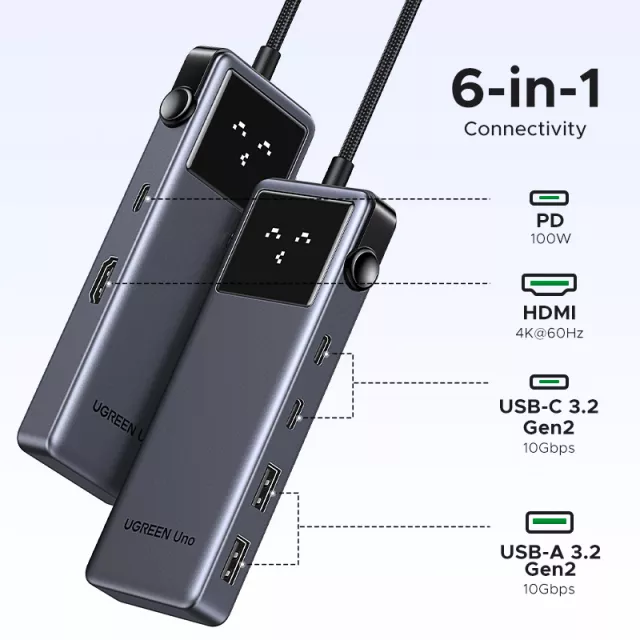
For a deeper look at how PD works in real setups (including hubs that support high-wattage pass-through charging), see the guide here: https://originzerostores.com/guide-6-in-1-usb-c-hub-4k-hdmi-10gbps-100w-pd-guide/.
What to check before using USB-C PD charging
First, confirm your laptop’s USB-C port supports charging via PD (some USB-C ports are data-only). Next, match charger wattage to your laptop’s needs—many ultraportables charge well at 45W–65W, while larger models may require 90W–140W. If you use a hub or dock, make sure it supports PD pass-through and that its max PD rating is high enough for your laptop, especially if you’ll be running multiple accessories at the same time.
FAQ
Can you charge a laptop with a USB-C hub that has PD?
Yes, if the hub supports PD pass-through and your laptop accepts USB-C PD charging. You’ll also need a USB-C PD charger connected to the hub with enough wattage to cover both the laptop and any attached peripherals.
Recommended for you










Leave a comment