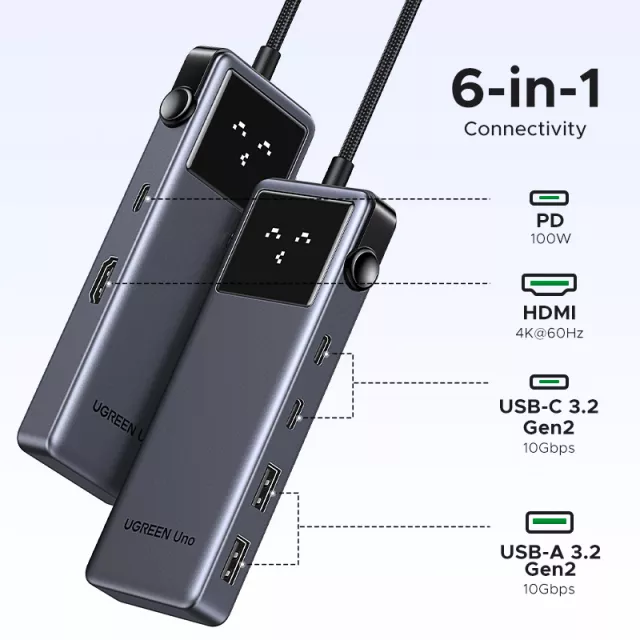
USB-C Hub 6-in-1 with 4K HDMI, 10Gbps Data, and 100W Power Delivery for Laptops & Devices
A compact USB-C hub can turn one port into a full workstation—adding a 4K display output, fast data transfer for drives, and pass-through charging for a laptop. This guide breaks down what each feature does, what to check for compatibility, and how to set it up for stable video, fast transfers, and reliable power.
What a 6-in-1 USB-C hub adds to a laptop
A modern laptop can be incredibly capable while still feeling “port-limited.” A 6-in-1 USB-C hub solves that by expanding a single USB-C connection into the ports most people use every day—especially at a desk, in a conference room, or while traveling.
- Expands a single USB-C port into multiple connections for display, storage, and peripherals.
- Supports external monitor setups through HDMI for larger screens, presentations, or streaming.
- Enables high-speed data for SSDs and other devices where transfer time matters.
- Pass-through Power Delivery keeps a laptop charged while the hub is in use, reducing cable clutter.
- Useful for travel and hot-desking: one plug-in can connect monitor, drive, keyboard/mouse, and charging.
Key features explained: 4K HDMI, 10Gbps data, and PD 100W
4K HDMI output (what “4K” really depends on)
4K HDMI is designed for crisp, detailed output on compatible monitors and TVs. In practice, the refresh rate you can use (for example, 30Hz vs 60Hz) depends on your laptop’s USB-C video support and the display’s HDMI capabilities. The hub can only pass along what the host device can provide—so the USB-C port must support video output via DisplayPort Alt Mode, Thunderbolt, or USB4.
For background on how USB-C can carry DisplayPort video, see the VESA overview of DisplayPort Alternate Mode for USB Type-C.
10Gbps USB data (who benefits most)
10Gbps data (often associated with USB 3.2 Gen 2) is built for fast external storage and high-performance peripherals. It’s especially helpful for external SSDs used for video files, photo libraries, project folders, or quick backups. Keep in mind that “10Gbps” is the link speed; real-world transfers vary with the SSD’s performance, the cable quality, and the laptop’s USB controller.
PD up to 100W pass-through (how charging actually behaves)
Power Delivery (PD) pass-through lets you plug a USB-C charger into the hub so the laptop can charge through the same hub connection used for data and video. Even with a 100W-capable hub, the laptop may receive less than the charger’s full rating because the hub and attached devices also need power. For the specification basics, USB-IF’s overview of USB Power Delivery is a helpful reference.
One USB-C port doesn’t guarantee everything
Some USB-C ports support data only, while others support video (Alt Mode) and/or Thunderbolt/USB4. If you’re buying a hub specifically for HDMI output, confirming video support on the laptop is the single most important step.
Compatibility checklist before buying
If you’re unsure what your display supports, the official HDMI Specification Overview provides a general reference for HDMI capabilities (your actual device support still depends on the laptop and the display).
At-a-glance specs and use cases
Feature overview and what it’s for
| Feature |
What it enables |
Best paired with |
Common limitation to watch |
| 4K HDMI output |
Connects an external display/TV |
4K monitor + certified HDMI cable |
Laptop USB-C must support video (Alt Mode/Thunderbolt/USB4) |
| 10Gbps USB data |
Fast file transfers and responsive peripherals |
External SSDs, card readers, capture devices |
Speed depends on device, cable, and host port |
| PD up to 100W pass-through |
Charges laptop while using the hub |
A charger matched to laptop wattage |
Some wattage is reserved for the hub/peripherals |
| Multi-port expansion |
Connects multiple devices at once |
Keyboard, mouse, drive, monitor |
Too many high-draw devices can require external power |
How to connect and set up for stable performance
When a cheaper hub is (and isn’t) a good idea
Product options in stock
FAQ
What is a USB-C PD hub?
A USB-C PD hub supports Power Delivery pass-through, meaning a USB-C charger plugs into the hub and the hub delivers power to the laptop while also running connected devices. The laptop may receive less than the charger’s full wattage because the hub and peripherals draw power too.
Are cheaper USB-C hubs worth it?
They can be worth it for basic peripherals and occasional use, but they’re more likely to struggle with stable 4K video, sustained high-speed storage performance, and heat or power limits. For everyday monitor-plus-SSD setups, prioritize build quality, a strong PD rating, and confirmed video support over extra ports.
How do I connect my USB-C hub to my laptop?
Plug the hub into your laptop’s USB-C port, connect your PD charger to the hub, then attach HDMI to your display and add any drives or peripherals. If you get no video, confirm the USB-C port supports video output; if charging is slow, check charger wattage and cable rating; if drives disconnect, use a shorter cable and keep the charger connected.
Recommended for you











Leave a comment