Is there a downside to using a USB hub?
Answer
A USB hub can be incredibly convenient, but there are a few real downsides to keep in mind—most of them tied to power, bandwidth, and compatibility. The good news is that many issues are avoidable when you match the hub to your devices and workflow.
The most common tradeoff is shared data bandwidth. With many hubs, multiple ports still funnel through a single upstream connection to your laptop or desktop. If you plug in several high-speed devices at once (like an external SSD, a webcam, and a capture device), they may compete for bandwidth, causing slower transfers, lag, or dropped frames.
Power is the other big factor. Bus-powered hubs draw power from the host device, which can be limiting for peripherals that need more current (portable hard drives, RGB keyboards, some audio interfaces). Even powered hubs can have constraints—especially if you’re also using passthrough charging. If the hub supports USB-C Power Delivery, the “advertised” wattage may be the input limit, while the hub itself reserves some power for operation.
Compatibility quirks can also show up. Some hubs handle display output (like HDMI) using specific modes (such as DisplayPort Alt Mode). If a laptop’s USB-C port doesn’t support the required mode, video output won’t work no matter what adapter is used. Certain devices, especially older printers, specialized dongles, or high-end audio gear, may be sensitive to hub chipsets and behave inconsistently.
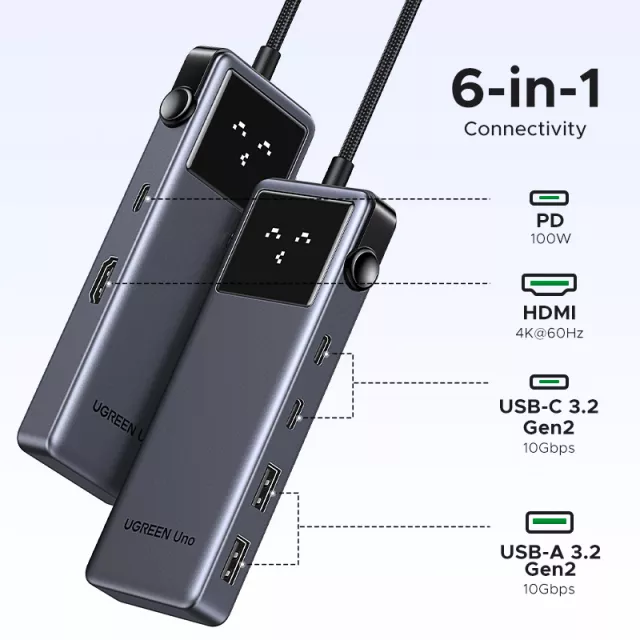
Finally, reliability depends on build quality. Cheaper hubs may run hot, loosen at the connector over time, or provide inconsistent performance under load. If you rely on a hub daily, it’s worth choosing one with the right port mix, speed ratings, and charging support. For a deeper walkthrough of features like 4K HDMI, 10Gbps ports, and 100W PD, see this 6-in-1 USB-C hub guide.
FAQ
Will a USB hub slow down my external SSD?
It can if the hub and upstream connection don’t have enough bandwidth, or if multiple fast devices are active at the same time. Using a hub with 10Gbps USB ports and connecting the SSD to a high-speed port helps minimize slowdowns.
Recommended for you









Leave a comment