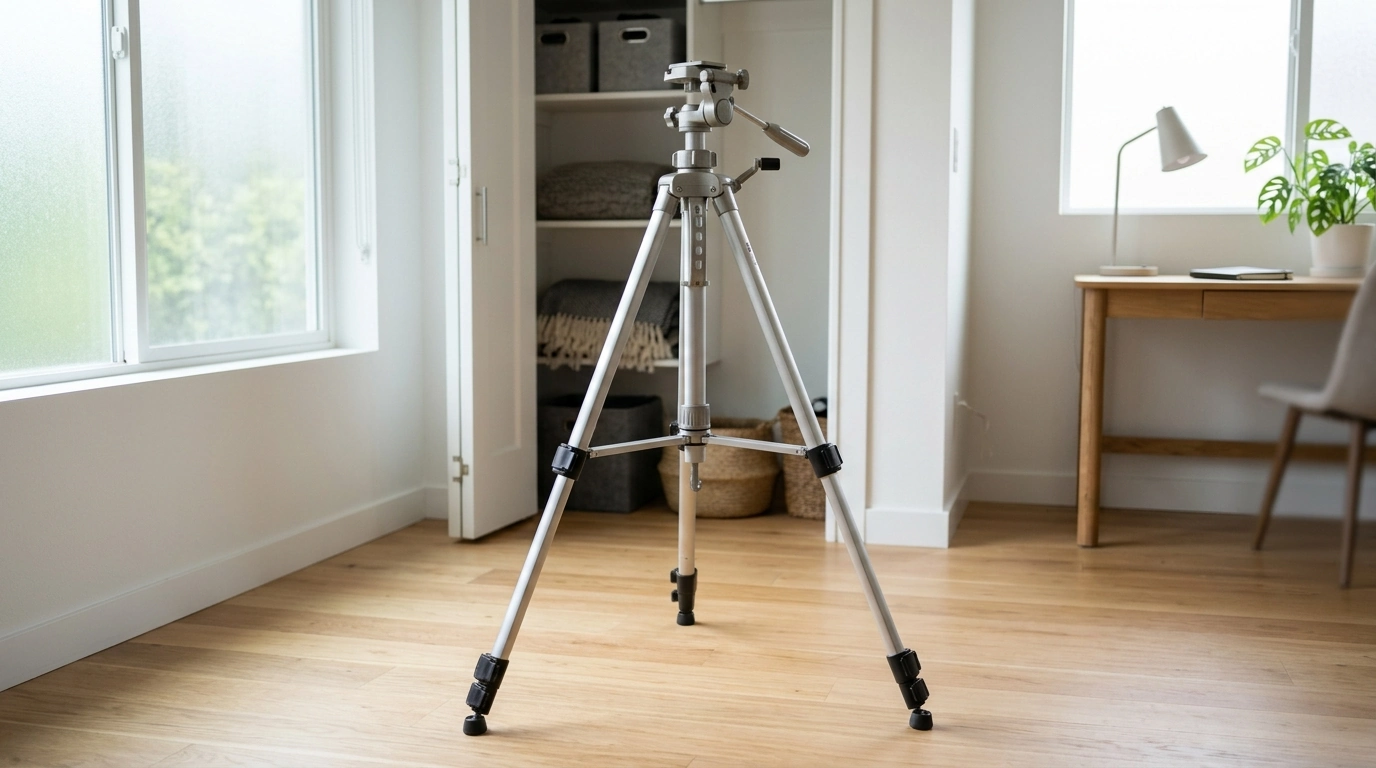
A portable stand can make it easier to organize a setup that moves from one room or location to another. Our 59″ Portable Aluminum Tripod Stand offers an aluminum construction and a portable design for shoppers who want that flexibility. Before you order, it helps to consider your equipment, the space around your setup, and the specifications that affect a secure fit.
Our 59″ Portable Aluminum Tripod Stand is an option to consider when you need a stand you can take between locations. Aluminum construction and portability are identified in its product name, while the 59″ designation gives you a measurement to clarify as you compare options.
The listed price is $85.97 USD. It was in stock at the time of planning, but price and availability can change, so confirm both on the product page before ordering.
Where a portable stand can fit into your routine
A portable stand can be useful when you do not have one permanent place for your equipment. You might want to move a setup between work areas, bring it to another location, or clear floor space when you are finished. Thinking through those transitions helps you decide which dimensions and features matter most to you.
Start with the space where you plan to use it. Allow enough room for the legs to sit securely and for you to reach the equipment without crowding the setup. If people will be walking nearby, choose a position away from the main route through the room.
Consider transportation and storage, too. Folded dimensions can help you determine whether a stand will fit in your storage area or vehicle. If you expect to carry it frequently, confirm its weight and any carrying accessories rather than relying on the word “portable” alone.
Check the fit before you buy
The first question is whether your equipment can attach securely. Compare its mounting connection with the stand’s connection, and confirm whether an adapter is needed and included. Do not assume a fit based only on the general description of a tripod stand.
Next, look for the specified load capacity and compare it with the total weight of everything you intend to attach. That total may include a mount or other accessory as well as the main piece of equipment. If a capacity is not provided, contact our team for clarification before placing an order.
Working height is another important detail. The 59″ measurement appears in the product name, but it should not be treated as a confirmed minimum or maximum working height without further specifications. Confirm how that measurement applies and whether the available height range suits your intended position.
Finally, review the folded dimensions and included accessories. Knowing what comes with the stand helps you plan your setup and avoid discovering later that you need a separate connection or accessory.
Tips for a stable setup
Place the stand on a level surface and position its legs securely before attaching equipment. Give the legs enough clear space, and follow any setup instructions supplied with the product. Attach your equipment only after the stand is properly positioned.
Check the locks and connections before use, especially after moving or adjusting the setup. Keep the equipment within the specified load capacity, and avoid placing the stand where someone could bump into it or trip over its legs.
Use extra care outdoors or on uneven ground. Choose a stable surface and consult the product specifications before deciding whether the conditions are appropriate. For general guidance on keeping routes clear, see OSHA’s walking-working surfaces resources.
Make it part of your setup
For a setup that moves, the appeal of an aluminum portable stand is flexibility: you can plan around more than one location instead of dedicating a single spot to your equipment. The right choice still depends on a compatible mount, suitable capacity, and a working height that meets your needs.
If your broader workspace also needs laptop connections, our USB-C Hub 6-in-1 with 4K HDMI, 10Gbps Data, PD100W for Laptops & Devices is a separate option to consider. Check its compatibility with your devices; it is not presented as a tripod accessory.
Visit the tripod product page to review the current details, and ask our team about any specifications you need before purchasing.
Before choosing, compare the product details with your daily routine, available space, care needs, and preferred setup. The strongest option is usually the one that fits the intended use clearly and remains simple to clean, store, and check before repeat use.
FAQ
What equipment can I use with this tripod stand?
Confirm that your equipment’s mounting connection is compatible with the stand and that the total attached weight is within its specified load capacity.
Is the tripod suitable for outdoor use?
Check the product specifications before using it outdoors, and choose a level, stable surface. Take extra care in changing conditions.
What does the 59″ measurement refer to?
The 59″ measurement appears in the product name. Confirm how it applies before purchasing rather than assuming it is the minimum or maximum working height.
Recommended for you









Leave a comment