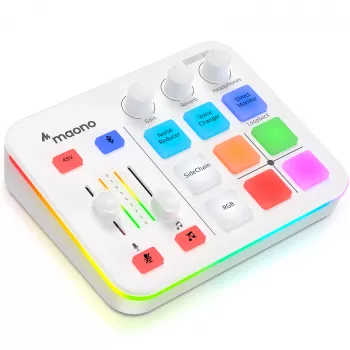
A good creative setup brings your voice, your equipment, and your workspace together. Our four-channel RGB audio mixer is designed for streaming, gaming, and podcasts, with an XLR interface and lighting that can complement your desk. Whether you are preparing for a live session or recording a conversation, a dedicated mixer gives you a place to organize your approach to audio. For more guidance, see FIFINE AmpliGame SC3 Audio Mixer Review.
A Mixer for Your Creative Setup
The four-channel design makes this mixer worth considering when your setup involves more than one audio source. Instead of treating your microphone, game, and other sound sources as an afterthought, you can plan how they fit into your overall workflow. The exact sources you can connect and control depend on the available connections and your other equipment, so map out your setup before buying. For further reading, see OneOdio Solocaster | Headphone Reviews and Discussion.
The XLR interface is relevant if you use a microphone with an XLR connection, while the RGB lighting adds a visual touch to a creator or gaming desk. Explore our RGB Audio Mixer with XLR Interface, 4-Channel for current pricing and availability.
Where It Fits: Streams, Games and Podcasts
Streaming
On a stream, your voice needs to be heard alongside whatever else your audience is listening to. Start by identifying your sources: perhaps a microphone, game audio, and sounds from your streaming software. Then confirm how each source will connect and how you will monitor the result.
If you use OBS Studio, its quick-start guide can help you get familiar with setting up and testing a stream. Your software settings and physical connections both matter; a mixer alone does not determine what your audience hears.
Gaming
For gaming sessions, consider both sides of your audio: what you hear through your headset and what teammates hear from your microphone. A desk mixer can be part of that arrangement, but compatibility varies by gaming device, headset, and connection type. Before purchasing, plan how your voice and game audio will reach the devices you use.
Podcasting
A dedicated mixer can give your podcast setup a central place for audio controls. It is especially useful to plan ahead if you expect to add equipment or record with another person. The number and type of microphones you can connect depend on the mixer’s inputs and the requirements of your equipment, so confirm those details rather than assuming four channels mean four microphone inputs.
Matching the Mixer to Your Setup
| Use |
Planning priority |
Check before buying |
| Streaming |
Manage voice alongside other audio |
Required connections and software compatibility |
| Gaming |
Plan voice communication and game audio |
Compatibility with the gaming device and headset |
| Podcasting |
Connect a suitable microphone |
Microphone requirements and available inputs |
Getting Ready to Connect
XLR is a common microphone connection, but the connector is only one part of the decision. Check whether your microphone requires phantom power and whether the mixer supplies the power it needs. Also make sure you have an appropriate cable. For a useful introduction to microphone types and terminology, see Shure’s microphone basics.
Next, look at the path from your mixer to your computer or gaming device. Confirm the supported connections, operating system requirements, and any cables or adapters needed for your setup. If your laptop is short on ports, our USB-C Hub 6-in-1 with 4K HDMI, 10Gbps Data, PD100W for Laptops & Devices is another option to consider for compatible devices. Verify the mixer’s connection requirements and the hub’s compatibility before relying on them together.
Once everything is connected, start at moderate levels. Speak at your usual volume, listen through your monitoring setup, and make a short test recording before going live. Adjust one part of the setup at a time so you can identify what changes the sound.
Make the Mixer Part of Your Space
RGB lighting can help tie your mixer into a gaming or creator desk, whether the rest of your space is understated or colorful. Place the mixer where you can reach it comfortably without stretching across your keyboard or microphone. Leave enough room behind and around it for connected cables, and avoid pulling cables tight against their connectors.
We recommend thinking about your daily routine as well as your equipment list. A comfortable position and a quick sound check can make it easier to settle in before a stream, game, or recording. Ready to plan your setup? Explore our four-channel RGB audio mixer.
Before choosing, compare the product details with your daily routine, available space, care needs, and preferred setup. The strongest option is usually the one that fits the intended use clearly and remains simple to clean, store, and check before repeat use.
FAQ
Can I use an XLR microphone with this mixer?
The mixer is listed with an XLR interface. Check your microphone’s connector and power requirements against the mixer specifications before buying.
Is this mixer suitable for streaming and podcasts?
The mixer is marketed for streaming, gaming, and podcasts. Confirm its connections and compatibility with the rest of your setup.
What should I check before connecting my equipment?
Check the inputs, outputs, cables, microphone power requirements, and device compatibility needed for your intended setup.
Recommended for you









Leave a comment